7 Key ForeFlight Dispatch Features Changing Business Aviation Planning in 2026


Picture this: It’s 7 AM, and a flight is departing in the next few hours. Overnight, the passenger list changed, the fuel price at the second stop dropped, and the weather along the route is developing faster than forecasted. This isn’t a hypothetical scenario; these are challenges flight planners face every day.
Most flight operations rely on a fragmented set of tools across different systems. Route planning, performance calculations, crew scheduling, and compliance tracking exist in separate systems. Experienced flight planners are skilled at navigating these systems quickly enough to create a sense of cohesion, but that often introduces bottlenecks. It might be data that has to be re-entered as it moves between systems, or an SOP everyone knows, but the system doesn’t enforce automatically.
ForeFlight Dispatch was built to remove that fragmentation. Planners have everything they need in one place, connected with real-time updates. In this blog, we’ll highlight seven features that show how Dispatch creates a connected operation.
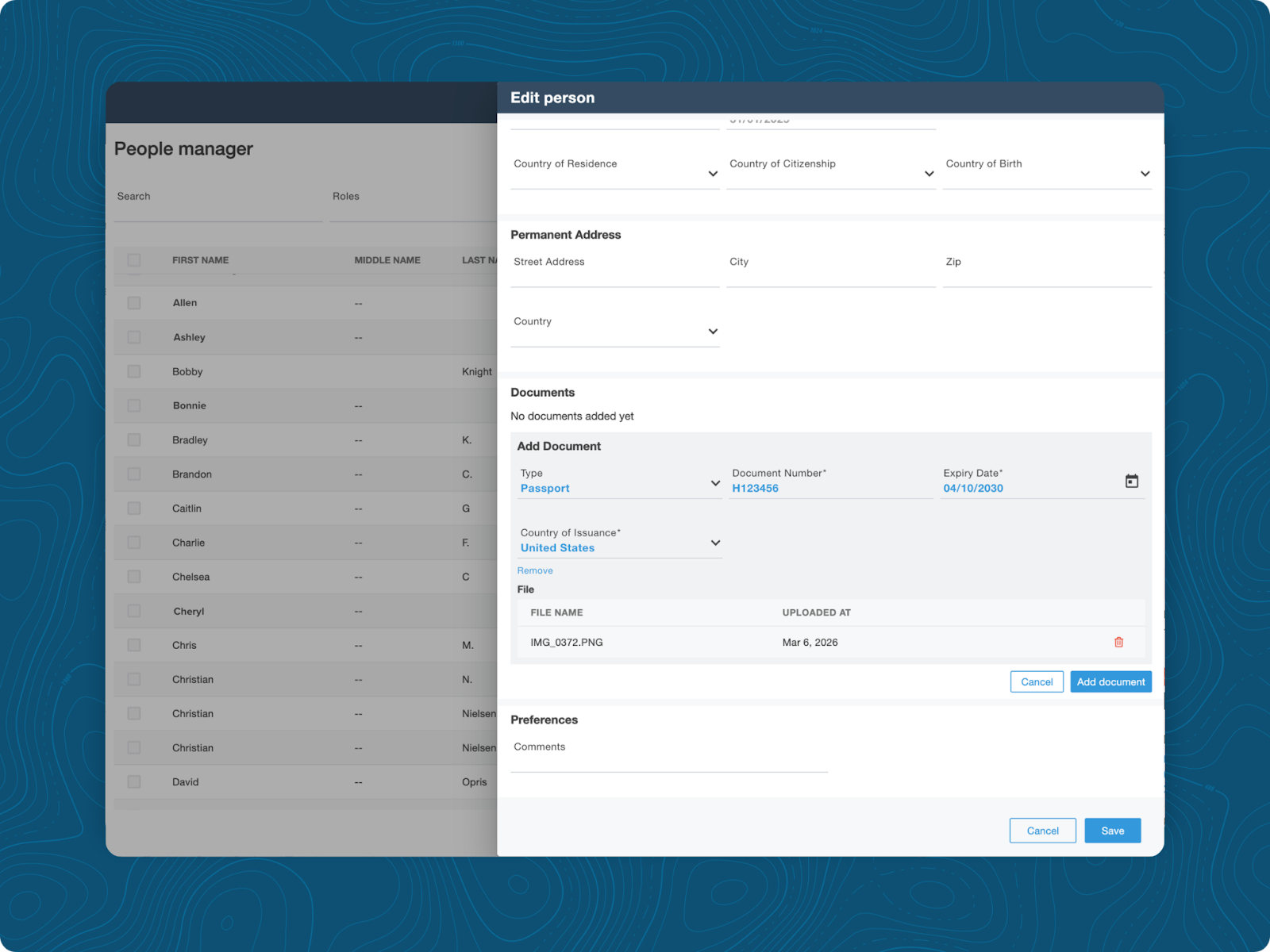
eAPIS
What is eAPIS?
The Electronic Advance Passenger Information System (eAPIS) is a U.S. Customs and Border Protection (CBP) web-based application used to streamline the sharing of passenger information for flights that cross the U.S. border. It requires pilots of private aircraft and commercial carriers to submit passenger and crew manifests electronically at least one hour before departing or arriving in the U.S., helping enhance border security.
Why it’s beneficial to flight planners
Filing through CBP's standalone portal means entering the same passenger multiple times. That’s manageable on a routine trip with a static manifest, but it gets tricky if a passenger is swapped just a few hours before an international flight. It can also become an issue if a filing error shows up at customs rather than during the planning process. The gap between “we filed” and “we filed correctly, with current information” is where international trips get tricky.
eAPIS filing is built directly into Dispatch, allowing Planners to submit U.S. CBP manifests directly from Dispatch. This eliminates the need to log into a separate CBP portal and re-enter passenger information. Passenger profiles are also saved and reused, so repeat travelers don’t need to re-enter their information for every international flight.
Real-world application
An international charter departs Westchester County Airport (KHPN) at 10 AM. A few hours before departure, the planner learns that one of the three passengers has been swapped. They quickly update the passenger in Dispatch, rebuild the manifest using stored passenger information, and refile with eAPIS before the crew arrives at the aircraft.
Route Builder
What is Route Builder?
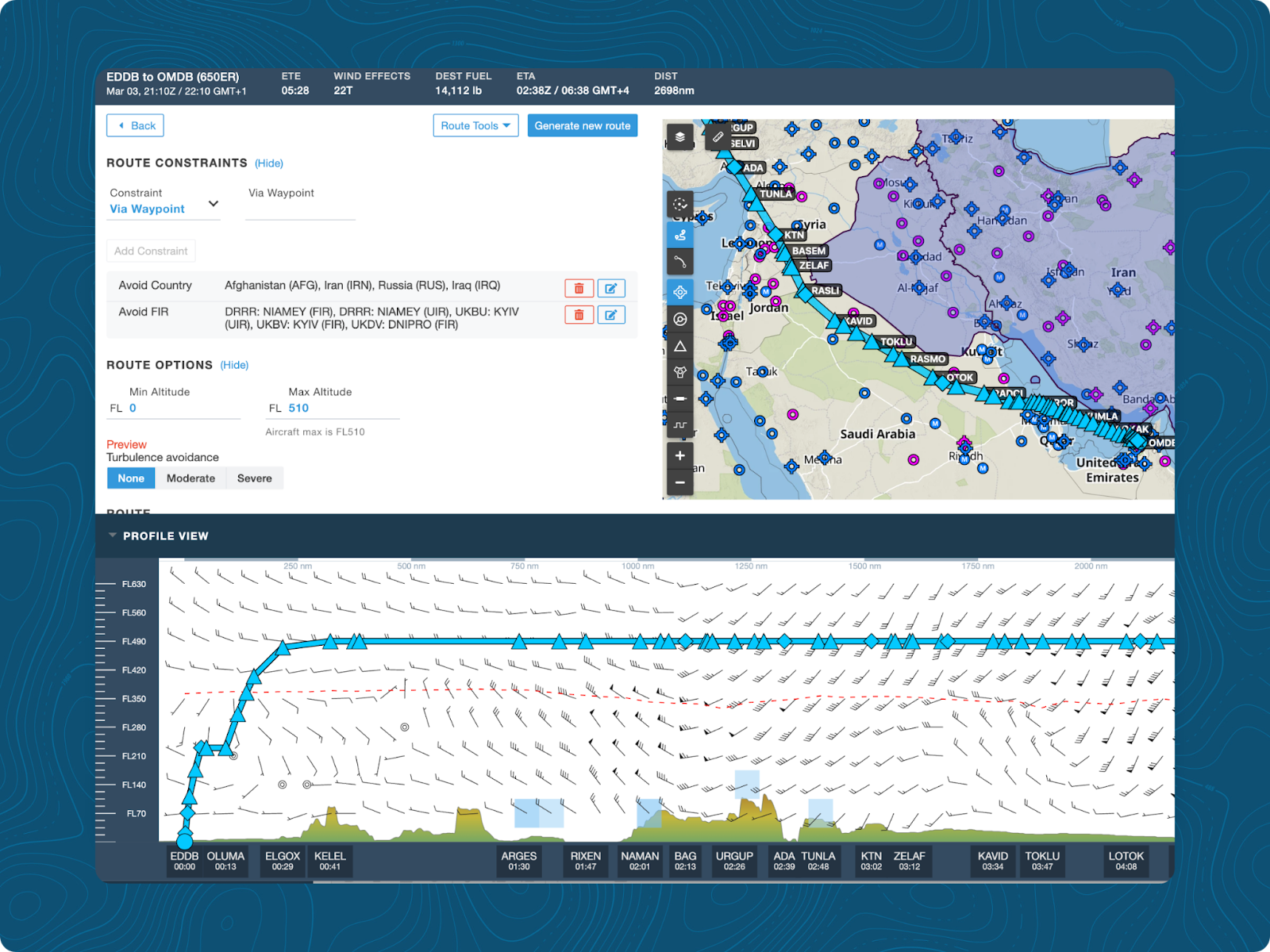
Route Builder is where flight plans are created, validated, and filed. It supports auto-routing preferences and interval routing for oceanic and remote segments. It also validates AIRAC cycles and includes commonly used routes from operators who have recently flown the same city pair. A color-coded indicator confirms whether a route is valid before it’s ever submitted, giving planners more control over flight path creation and the ability to build precise flight plans that meet operational requirements.
Why it’s beneficial to flight planners
Airspace is getting more complex, and generic routing options rarely suffice. Routes need to be flexible enough to navigate around geopolitical hotspots, airspace closures, and weather while maintaining efficiency. With Route Builder, flight planners have granular control over every segment of the flight path.
Real-world application
A planner is building a flight from Berlin Brandenburg Airport (EDDB) to Dubai International (OMDB). Using Route Builder, they create a custom route that avoids overflying specific countries in Europe and the Middle East, as required by the operation's SOPs. The route is visualized on the map, alternate airports are confirmed, and waypoints are adjusted until the flight path meets every requirement.
Airport Page
What is Airport Page?
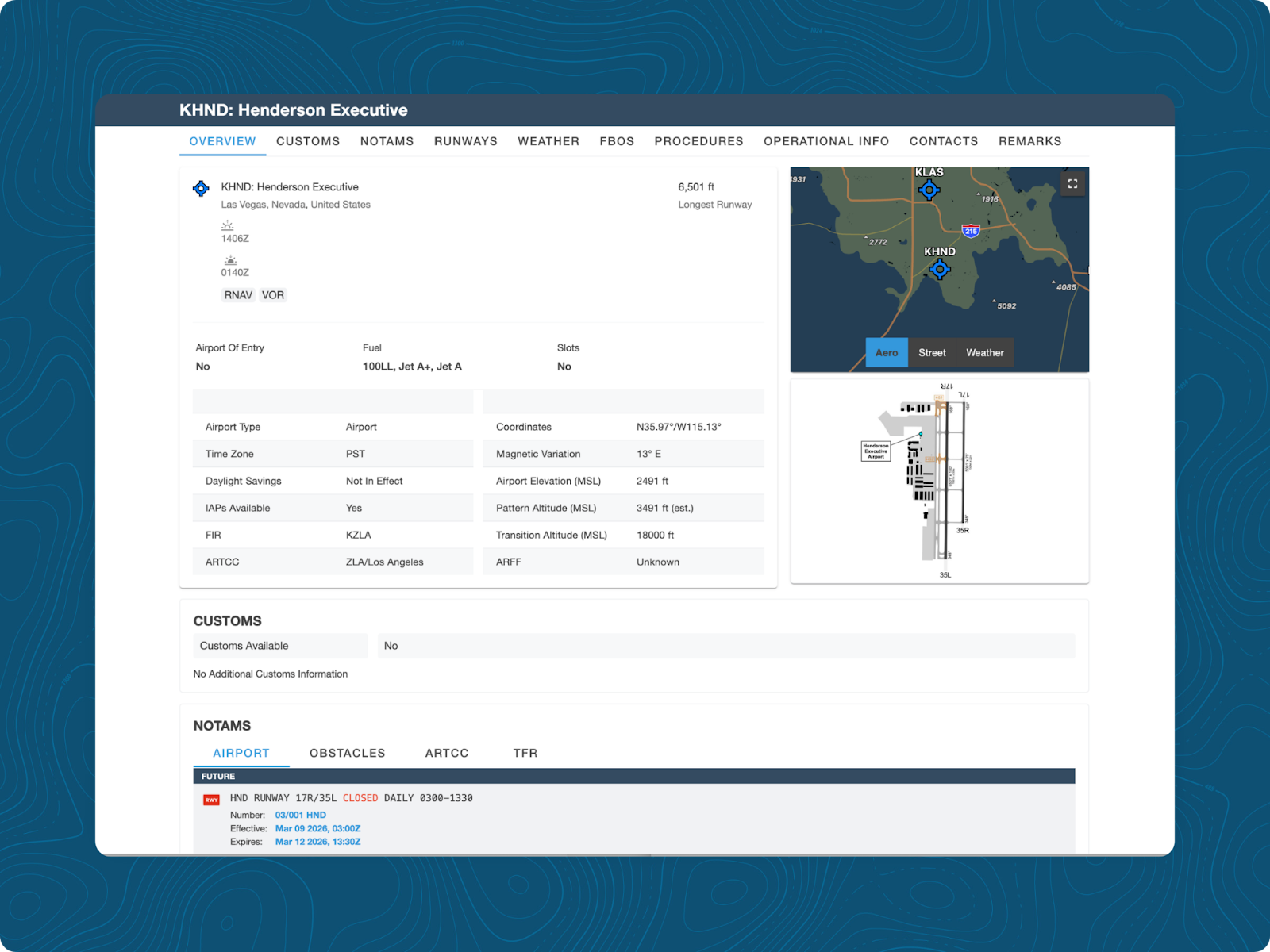
The Airport tab in Dispatch pulls NOTAMs, runway data, procedures, FBO contacts, and other operational details into a single, organized view for any airport worldwide. Recently viewed airports appear at the top, so frequent destinations are just one click away.
Why it’s beneficial to flight planners
Creating an airport brief for a new destination usually involves gathering information from multiple sources: one for NOTAMs, one for FBO contacts, and one for procedures. Every jump between systems is a chance to overlook something, and that fragmented process can cause delays on multi-leg trips. A planner might find that by the time they return to the first airport, conditions have already changed.
Real-world application
A planner is building a four-leg trip with two fuel stops. On the Airport Page, the planned third airport shows no FBO or ground services available upon landing. The planner finds a nearby alternate with full services and adjusts the leg accordingly. Catching this during planning, before the route is filed, means there’s plenty of time to swap it for a more suitable one for the crew.
Fuel Advisor
What is Fuel Advisor?
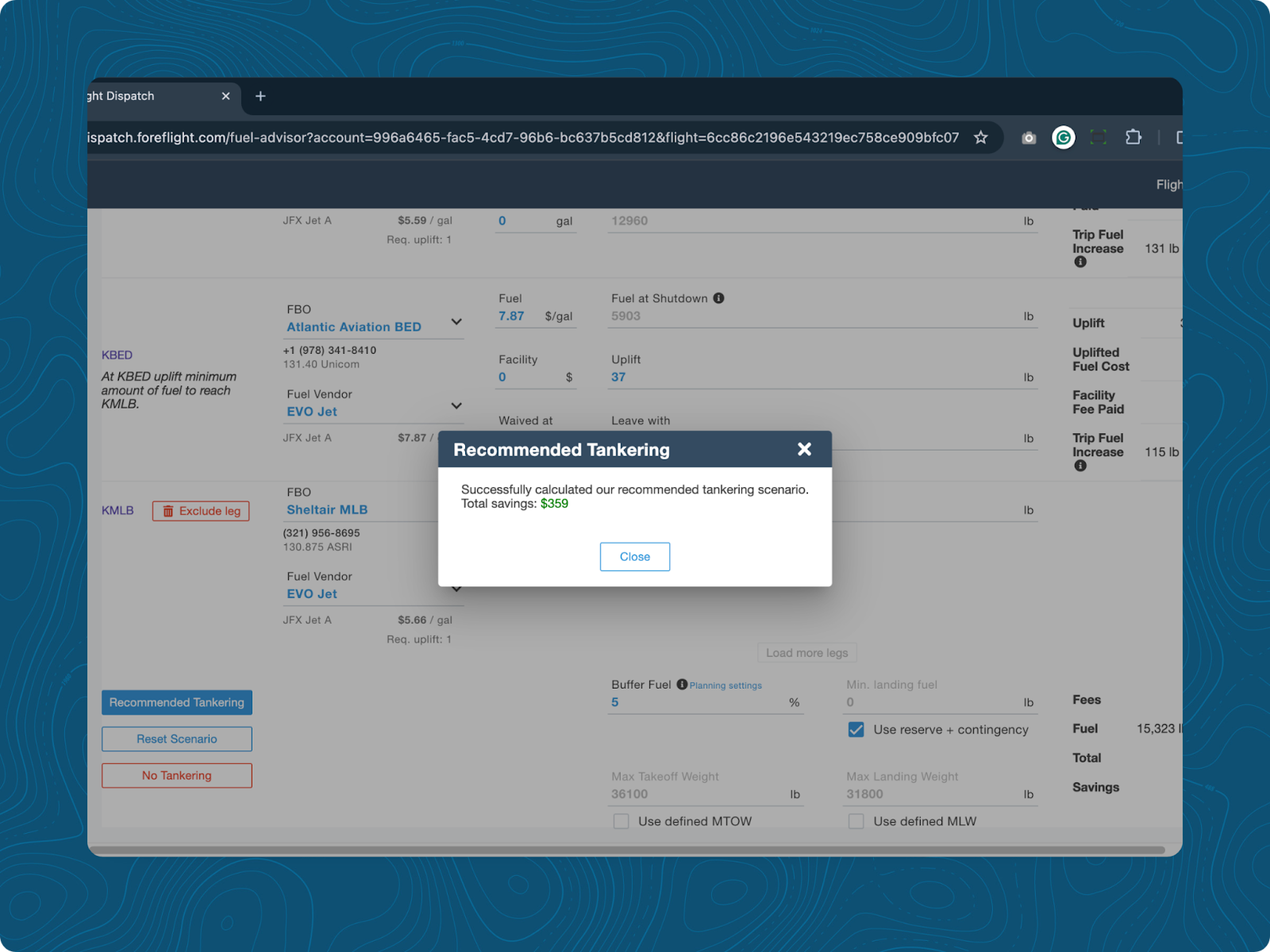
Fuel Advisor analyzes planned legs in a trip and recommends where, or where not, to uplift fuel along the route. It considers current prices, contract rates, aircraft performance, Weight & Balance, and Runway Analysis data.
Why it’s beneficial to flight planners
Manually checking tankering decisions for a multi-leg trip involves several steps. First, fuel prices are pulled from different sources. Then, performance calculations are run to see if the aircraft can handle the extra weight. Finally, the numbers are verified to ensure they remain accurate after any weight-and-balance changes. It’s a process that can take up a lot of time and needs to be done carefully. With ongoing global uncertainty, fuel prices can also fluctuate overnight, meaning fuel plans need to be recalculated. With Fuel Advisor, planners don’t have to choose between thoroughness and timeliness.
Real-world application
A three-leg international trip is planned for Thursday. Fuel prices at the second stop are significantly higher than at the departure airport. Fuel Advisor recommends uplifting extra fuel at the first stop and confirms that it remains within the aircraft's performance limits.
Procedure Advisor
What is Procedure Advisor?
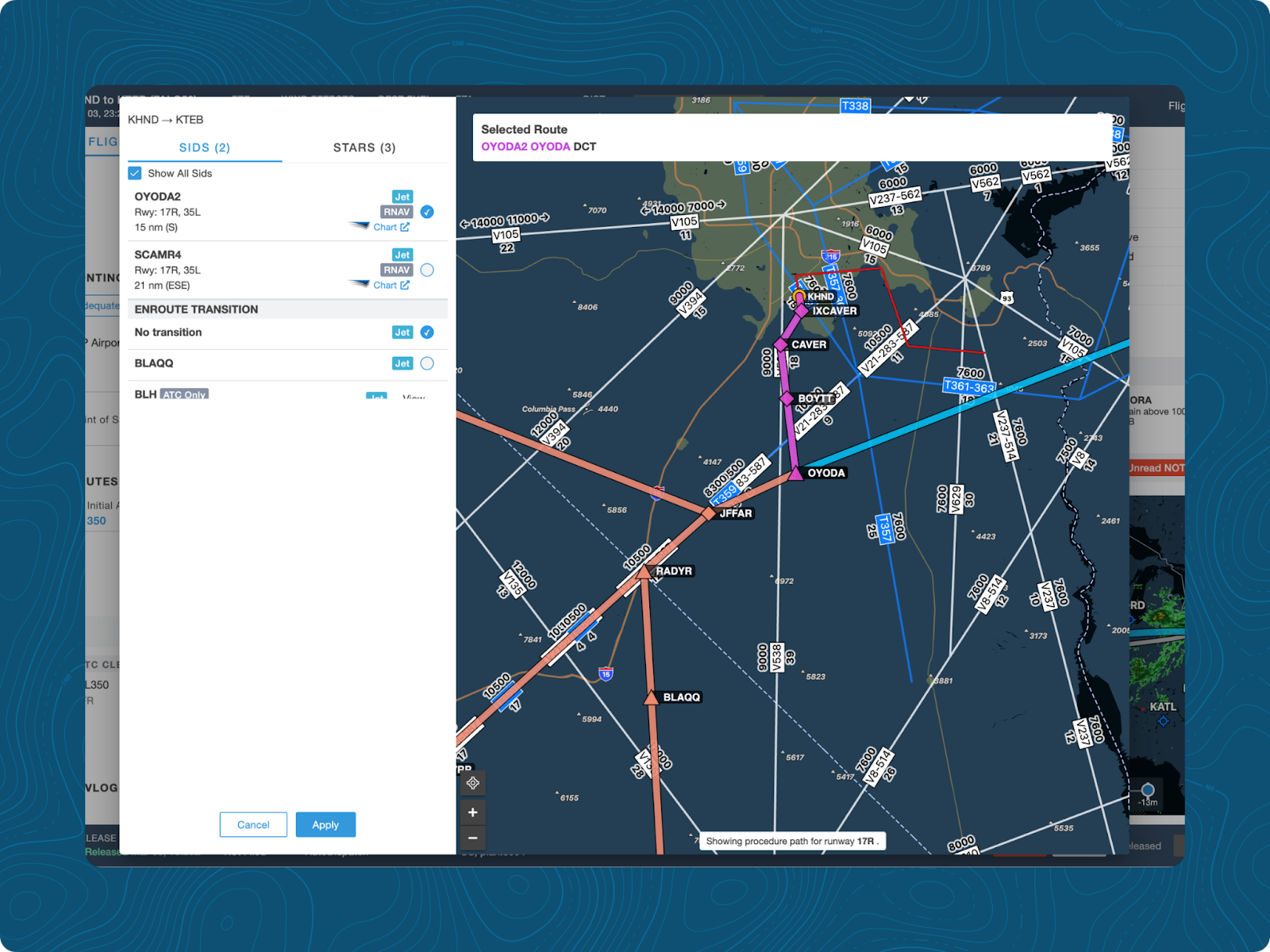
Procedure Advisor lets planners browse, preview, and add SIDs and STARs to a route directly within the planning workflow. Each procedure is labeled by approved aircraft type and can be previewed on an interactive map before it’s applied, so planners can see exactly how it connects to the en route segment before committing it to the plan.
Why it’s beneficial to flight planners
Selecting a procedure without seeing it in the context of the flight means relying entirely on chart interpretation. That works for familiar airports or common procedures, but in busy terminal areas with five or six SID options, it’s not efficient. A procedure that doesn’t link well to the en route segment, or one that ATC rarely assigns at a specific facility, adds extra work during clearance delivery. At best, it’s a correction the crew handles on the ground. At worst, it’s an amendment while airborne. It’s not uncommon to change procedures en route, but choosing the most likely options during planning frees up decision-making bandwidth for the crew.
Real-world application
A planner is choosing a departure from a major hub with six SID options available. Using Procedure Advisor, they preview each one on the map and quickly notice that two don’t connect cleanly to the planned route. A third is not designed for the aircraft type. They select the correct procedure, confirm the performance numbers, and apply it to the flight plan. The crew receives a complete, prebuilt route in ForeFlight Mobile, ready to brief, which adds greater accuracy to what they can expect to execute.
Operational Rules
What are Operational Rules?
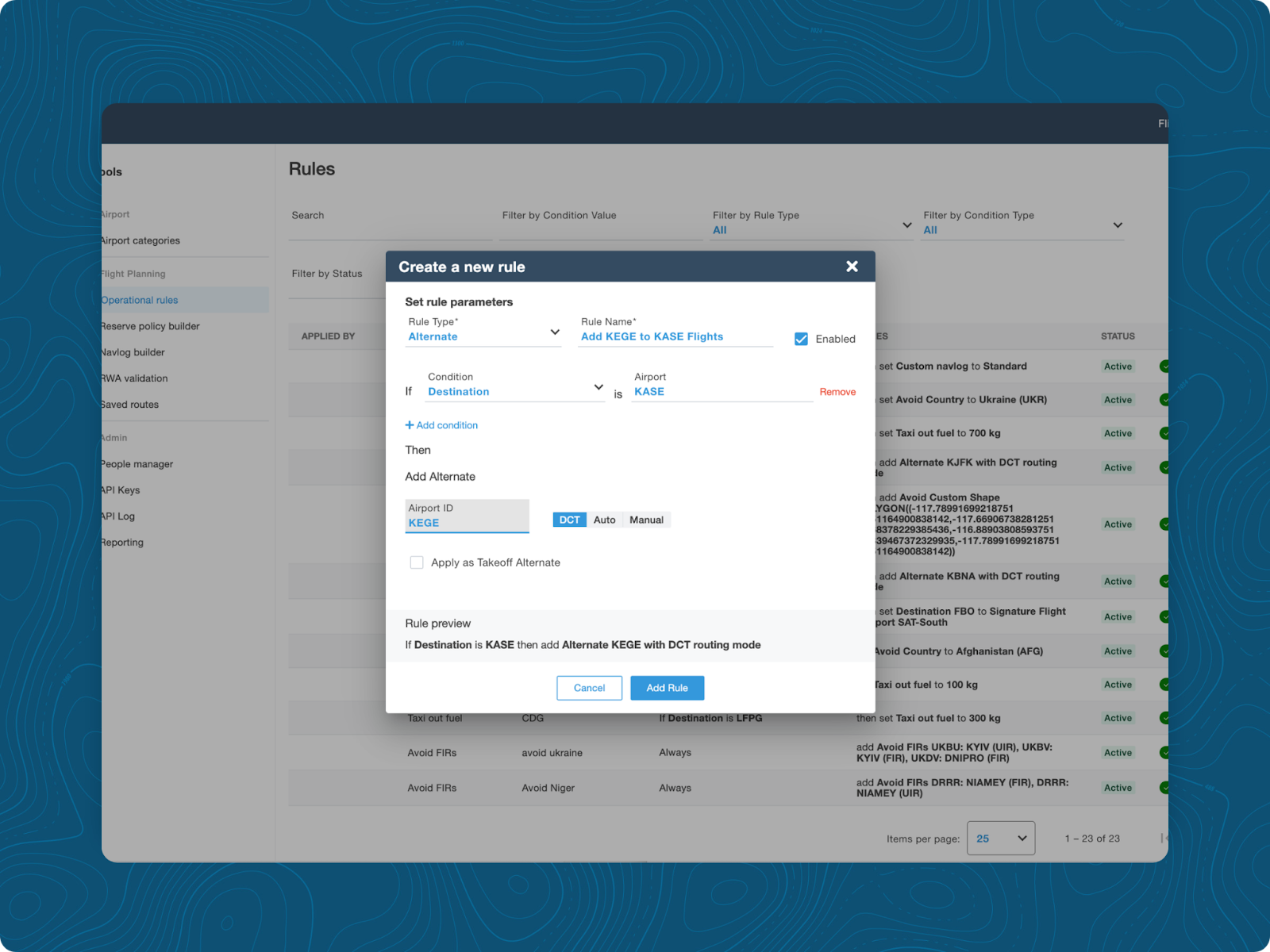
Operational Rules lets organizations add their standard operating procedures (SOPs) to their planning workflow in ForeFlight Dispatch. Rules can automatically apply call signs, restricted FIRs or countries, enforce alternate requirements, trigger crew notes, and notify users about aircraft type limitations, all before a flight plan reaches the crew. Individual rules can be overridden by toggling them on or off as operational requirements change.
Why it’s beneficial to flight planners
An SOP that exists solely in a manual relies on the planner's memory to apply it consistently across every flight without exception, regardless of the day's workload or how recently a team member joined. That consistency can degrade over time due to new hires learning the system before the exceptions, experienced planners skipping a step under time pressure, or the policy saying one thing and the flight plan reflecting another.
Real-world application
A flight department has a policy that requires a specific alternate airport for flights landing at Aspen/Pitkin County Airport (KASE). The rule is documented in the SOPs and configured in Dispatch. When the planner builds the trip to KASE, Dispatch automatically adds Eagle County Regional (KEGE) as the preselected alternate. The planner verifies that there are no NOTAMs that would prevent landing at KEGE and continues building the flight plan.
Map Layers
What are Map Layers?
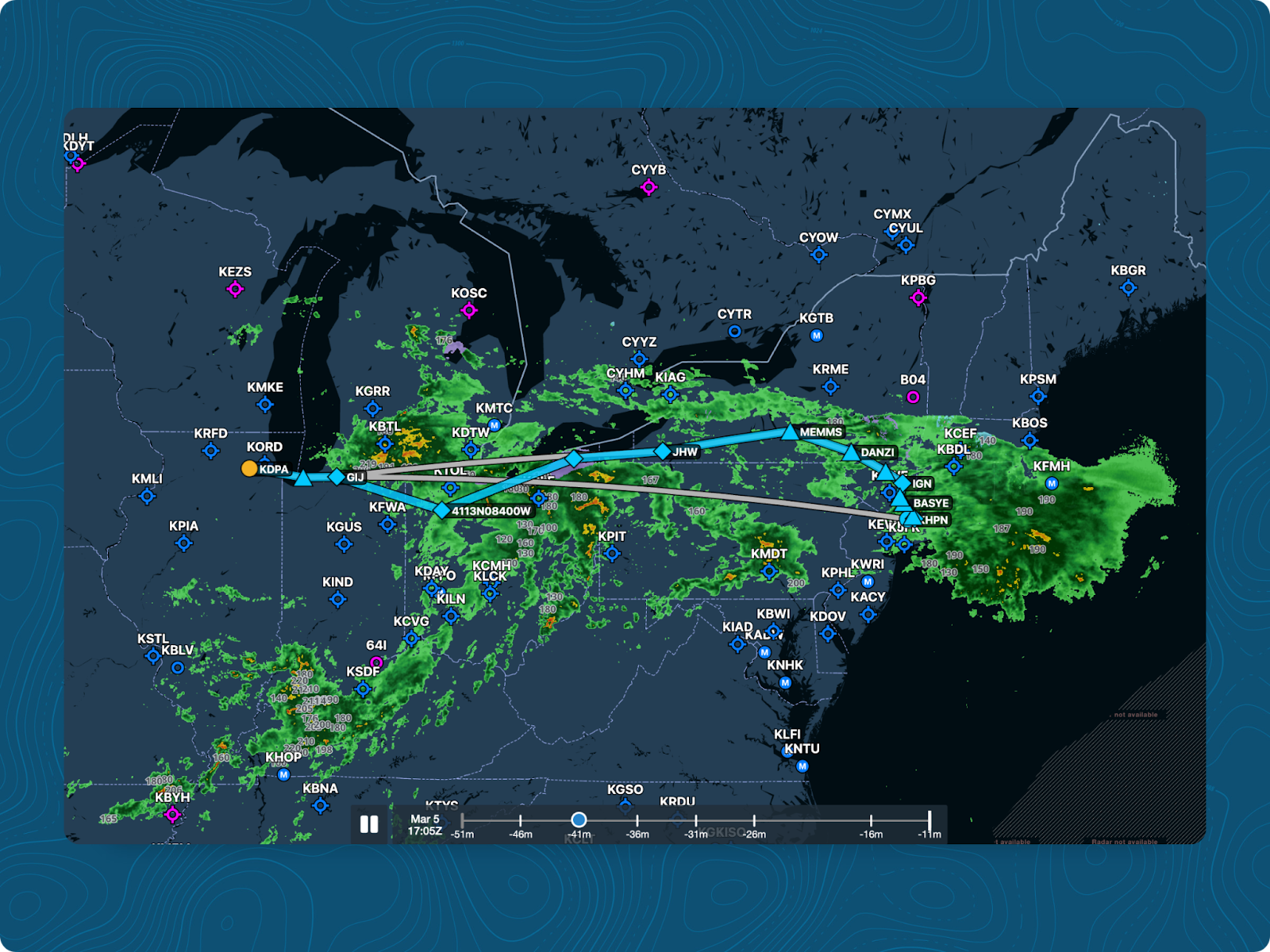
Map layers overlay real-time operational critical data, such as weather, TFRs, and restricted airspace, directly onto the route planning map in Dispatch. Planners see the full picture around a flight while it’s still in the building phase, not after it’s been filed.
Why it’s beneficial to flight planners
Planning a route without a live map view means potential conflicts don’t surface until the plan is filed, or until the crew is airborne and ATC issues a reroute. Checking the weather in a separate application and then comparing it with the planned route is a two-step process that can lead to missed items. A reroute that could have been built into the original plan becomes a coordination challenge mid-flight.
Real-world application
A planner is routing an afternoon departure through an area where convective activity is likely in the next couple of hours. With the map layers active, they see the storm system overlaid directly on the planned route, identify which segments are likely to be affected, and plan a reroute. This allows the crew to depart on a path that has already been optimized for the weather. What would have required opening a separate weather application and building a mental model of the planned route now happens in the same view where the flight is being built.
Each of these features is powerful on its own, but the real strength comes from working together seamlessly in ForeFlight Dispatch. Instead of relying on dozens of fragmented tools and piecing them together to build a flight plan, Dispatch serves as the hub of the operation, providing a single ecosystem for every aspect of a flight.
Spend less time coordinating between systems and more time making the decisions that keep flights on schedule and crews prepared.
To learn more about how ForeFlight Dispatch can streamline your operation, visit ba.foreflight.com/solutions/flight-planning.